
Free Tool
Circulta QR Guide
Your QR code is the only bridge between your physical product and the content behind it.
01
Learn to size, place, and print a QR code that scans every time
Most people know roughly what a QR code is. Only a few know what makes one actually work.
A QR code is the bridge you want to build between your physical product and the content.
Getting it right isn't about technical polish. You want to make sure the moment your customer scans your product, it just works.
Why read this guide?
If your QR doesn't scan, your customer never reaches your content: the text, the image, the audio, whatever you made for them.
What will you learn?
We want to make your creating process as simple as possible. You'll learn to place a QR code on any physical product, reliably.
With these principles your Circulta QR codes work for you in real-world light, at real-world distance, and on the actual material you're printing on.
In this guide
- #1 QR Basics: QR Anatomy, Circulta QR Code, Comparison
- #2 Best QR Practices: Size & Distance, Contrast & Color, Materials & Surfaces, Designer Codes
- #3 QR Testing
- #4 Communicate QR
- Next Steps
02
What is a QR code
A QR code is like a street sign. It always points to the same place, such as a website or text.
QR codes are sensitive. Each QR is limited to one action (link) only.
Once a QR is printed, it shows the same thing every time. Code cannot be altered without breaking the action or connection.
To change what people see, you have to update the page or content behind the link yourself.
How does the scanning work?
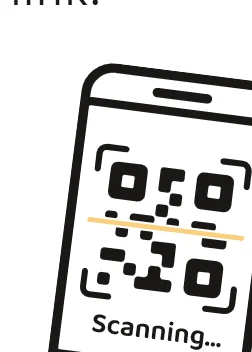
- Camera captures QR image.
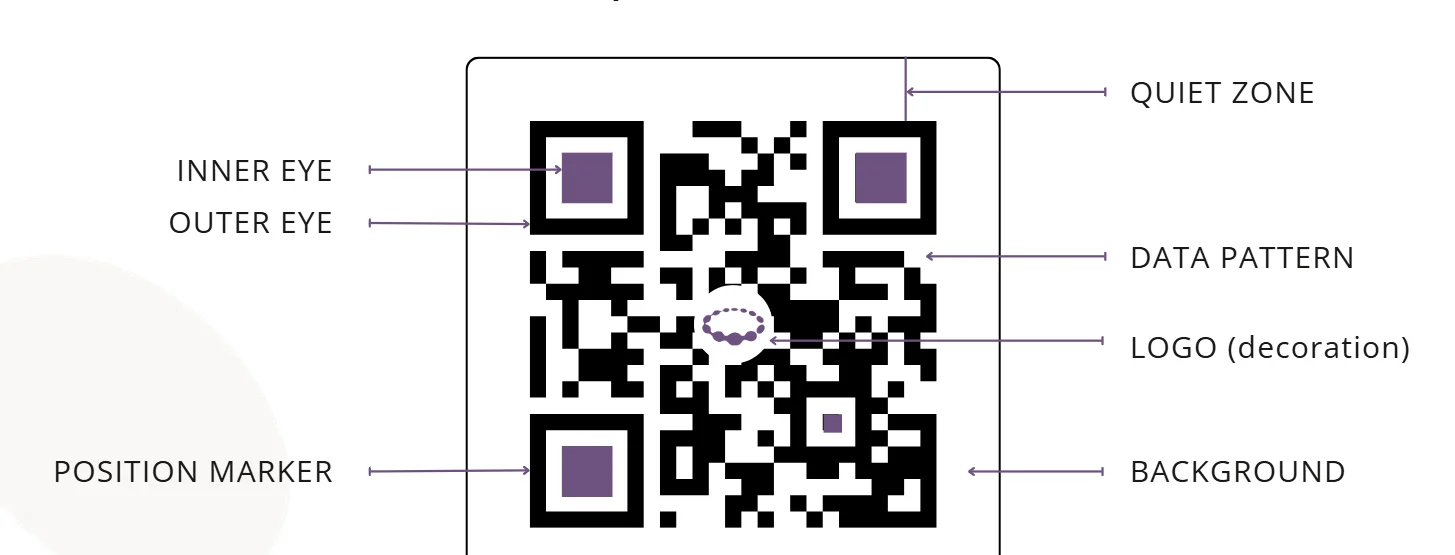
- Phone detects position markers.
- Data pattern is read.
- Decoder turns code to a link.
- Phone opens a link.
03
QR anatomy
04
Circulta QR code
A Circulta QR code works very differently compared to regular QR codes.
It's like a window that shows a new view every day, or like a portal that offers a new experience daily.
The code looks the same on the outside. The magic in Circulta QR is in a timed loop of your content.
Each day, the person scanning your QR sees that day's drop. Could be an image, a text or an audio clip.
The next day, the same code shows the next drop. When every drop has been shown, the loop starts again from the beginning.
- Daily drops. Circulta QR offers a new experience every single day.
- Non-stop year round. Circulta QR runs your content in a loop, all year round, automatically.
- Create once. Circulta QR delivers as long as you decide. Create once, or manage content actively.
Circulta vocabulary
Loop. A Loop is a series of content linked to one QR code. It shows one piece of content (a Drop) per day, then starts over when it reaches the end. One Loop can hold up to 160 Drops.
Drop (Daily Drop). A Drop is one piece of content in a Loop. It is an image or an audio clip, with optional text, and it is shown for one day.
05
QR vs. Circulta QR
A Circulta QR code works very differently compared to regular QR codes.

Good to know
- You set up each Loop once.
- Circulta QR code never changes.
- Adjust your content any time.
- Each Daily Drop can hold text, image and/or audio.
- Circulta System shows today's content automatically, every single day.
- The same Circulta QR code can be used freely on multiple products, designs and surfaces.
| Regular QR code | Circulta QR code | |
|---|---|---|
| What does it show? | Same thing every time | What it shows |
| How is it updated? | Manually, by you | Automatically |
| Need an app? | No | No |
| Value? | A link | Reason to come back |
| A regular QR code gives a permanent link to one content. | A Circulta QR code gives a permanent link to a daily content or experience every 24 hours, 365 days a year. |
More than just a QR code
06
Size & Distance
To make it very simple, the QR code only works if a phone can read it.

Facts to consider
- Bigger is safer. A QR code that is too small is the most common reason scans fail.
- A simple code pattern (shorter link) scans better.
- A curved surface, like a bottle, makes scanning harder. Add extra.
- Print quality matters: avoid blurry or smudged edges.
- Phone cameras vary in capability and focus.
Things that matter most are:
- #1 How big the code is.
- #2 How far away the scanner is.
The farther away the phone or a scanner, the bigger the code must be. Get these right and your code scans on the first try.
A simple rule of thumb: your printed QR code should be about one tenth [10:1] of the scanning distance.
Consider the scanning distance
| Scanning distance | QR code width |
|---|---|
| 8 in (20 cm) | 0.8 in (2 cm) |
| 20 in (50 cm) | 2 in (5 cm) |
| 3 ft (100 cm) | 4 in (10 cm) |
Smaller codes may scan with some printing methods and high print resolution, but the result is less reliable.
Make your QR width at least 0.8 in (2 cm).
Checklist
- Code is at least 0.8 in (2 cm) wide
- Code width is about one tenth of the scanning distance
- Quiet zone around the code is at least 4 small squares wide
- Add extra if the surface is curved
- Test print at real size with the same print method
- Test scan with two or three different phones
07
Contrast & Color
A phone reads a QR code by seeing dark and light squares. If the phone cannot tell them apart, the code will not scan.
Facts to consider
- Make the code dark on a light background. Not all phones read inverted codes.
- Use a dark/light contrast of at least 70%. (Black on white is 100%.)
- Glossy surfaces may cause glare; a matte finish is often safer.
- A busy background disturbs the scan. Keep the surrounding area plain.
- Only judge the printed code. A scan from an LED screen is deceiving.
- Using color is OK! As long as the contrast is enough.
Keep the code clearly darker than its background. Dark on light is the most reliable combination, and it works on the widest range of phones and scanner apps.
Camera reads contrast, not color. Only contrast matters (dark/light), not the hue (red/green). Do not trust your eyes. Two colors that look different to you can look identical to a phone's camera.
Consider the design
Let's say you're printing a QR code on a black mug. Almost any color on a dark background will fail. Simply use a contrast patch under your QR code, to make it pop.
Hack from a designer
Check the contrast by turning your design into grayscale. Use a filter or print it out in black and white.
Contrast matters more than a pretty color
Checklist
- Code is clearly darker than background
- Background is plain
- Surface is matte, or glare has been tested
- Test the print in the final colors
- Test scan in bright and dim light
08
Materials & Surface
Your QR code is only as reliable as the surface it's printed on.
The best surface is flat, matte and smooth, and the print method must reproduce fine detail. Every departure from that (curves, gloss, texture, stretch) removes some of the margin a code needs to scan.
Think about three things:
- shape (flat or curved)
- finish (matte or glossy)
- texture (smooth or rough)
Facts to consider
Glossy surfaces reflect light. A reflection that falls across the code can hide part of it. Matte finishes avoid this.
A curved surface distorts the code at the edges. Larger codes and gentle curves work best.
Rough or woven materials blur the edges of the modules. A bigger code and a plain background help.
Embossed, engraved, burnt or laser-etched codes depend on lighting and angle. Test them in real conditions.
Transparent or reflective materials, such as glass and foil, are the hardest to scan.
Stretch and fold change the code's shape. Avoid placing it on seams, creases or soft packaging.
Print method matters. Sharp edges come from methods like offset or good digital printing. Sublimation, screen printing and embroidery need larger codes.
Print-on-demand products vary between suppliers. Check the supplier's print area, resolution and color handling before you design.
Surfaces age. Scratches, wear and washing reduce sharpness over time. Consider how long the product will be used.
To be safe, always check a physical print proof before a full production run
09
Designer Codes
Your QR code needs clear space around it, and a design pattern the camera can actually recognize.
Facts to consider
- The three large squares in the corners are the code's anchors. Do not change their shape or cover them.
- A tiny logo in the center is usually fine, but keep it small.
- Compensate for the designer code risk by using a larger QR code.
- Dark-on-light still applies. Decoration does not cancel the contrast rule.
Some codes are shaped like animals, blended into photos or filled with illustrations. They are real and you can use them with a Circulta link, but use caution.
Designer codes look striking, but are they scannable? And if not, are they worth the risk?
The quiet zone is the plain border around the code. It tells the camera where the code starts and ends. At least 4 modules of empty space on every side is recommended.
Designer codes change the pattern to add style: rounded modules, logos in the center, colored gradients, or a picture woven into the code.
Each change removes some of the information the camera uses. Codes hidden in photos or drawn as images are the least reliable.
A QR code has built-in error correction, so it can survive some damage, but every decoration spends that safety margin.
A designer code is not a guarantee of better results. A standard code that scans every time sells more than a beautiful one that fails.
10
Save By Testing
A code that looks right is not the same as a code that works.
Testing is the last step before printing, and it is the cheapest way to avoid a batch of products with a code that fails.
A test takes minutes. A reprint costs money, time and trust.
Why does testing matter?
Every earlier choice (size, contrast, quiet zone, material) affects scanning. Each one may be fine on its own, yet the combination can still fail.
Screens hide problems: a code on your monitor is bright, sharp and flat. The printed product is none of these.
Only a test on the real product shows what your customer will see.
Be brave when hunting design mistakes: spotting them early is priceless.
How to test
- Print a test copy at real size, using the same material and print method as the final product.
- Scan it with several phones. Use at least one iPhone and one Android, ideally one older model.
- Try different conditions: bright light, dim light, and different angles.
- Try different distances: close, and as far as a customer would realistically stand.
- Open the result. Check that the code leads to the right place, and that the page loads quickly.
Checklist
- QR code works
- Physical product works
- Scan tests passed
11
Educate Them
A short, clear invitation turns a curious glance into a scan.
Your code can be perfect and still go unscanned. Many people do not know what a QR code does, or whether it is safe to scan.
Why does communication matter?
Scanning a code is a small act of trust. People are cautious about unknown codes, and with good reason. People scan when they know what they get. A clear promise beats a clever design.
Educating your audience or customer matters even more for your Circulta QR.
People are used to single-content, one-stop QR codes, so they may not realize the daily value of your code. If the customer does not understand that, they scan once, or never.
A Call to Action invites scans more than any QR code alone. Don't be shy!
Design around your product?
There's no need to ruin your design with too much information, either. Consider adding a short note on packaging, be clear on your sales page and add a cool insert when shipping your products.
How to tell?
- What? Say what your QR opens.
- Why? Name the benefit.
- How? Give a simple instruction.
Use a CTA on the product
- Place the text close to the code, make it obvious and readable. Consider where the eye lands first.
- Hint at the daily rhythm to encourage repeat visits. Use eye triggers: 24h and 365 days.
- Keep it short, make it simple.
- Instead of using QR alone, add a call to action: Scan today's poem.
- Instead of plain Scan Me, add depth: Scan a new poem every day.
- Instead of generic Visit our site, add pull: New poetry drops daily. Scan to open today's poem.
Don't be shy, tell them!
12
You've Got This!
Your work deserves a QR that opens every time, and now you know how to make one.
Circulta Circle
Join the Circulta Circle and keep learning for FREE. The Circle community is based on Substack for easy access. We send newsletters and publish a blog with inspiration, new ideas and tips for creatives. You don't need to be a customer to join, all creatives are welcome.
Toolbox & website
Go to our website and get some new ideas that kickstart your creativity. We offer plenty of FREE guides and templates in Toolbox.
Sign in & build
If you haven't already, create a free account and test out the Circulta System. Build your first Loop. Or build the next one. Upload your creative archive and start creating. Loop drafts are 100% FREE to build. Activate when ready.
Now go and create some magical Loops!
Was this helpful?